


 Garantía de entrega





Artículo: AMZ-B07RQ6DJV7
KOQICALL
KOQICALL Take a Number System Wireless Queue Management System Ticket Number Waiting System 3 NEXT Call Button 1 Counter Display English Voice Broadcast for Bank Service Center Bus Station Clinic
Model:
C31+O3-N 1+3
Detalles del producto
Disponibilidad
En stock
En stock
Peso con empaque
0.97 kg
0.97 kg
Devolución
Sí
Sí
Condición
Nuevo
Nuevo
Producto de
Amazon
Amazon
Viaja desde
USA
USA
Sobre este producto
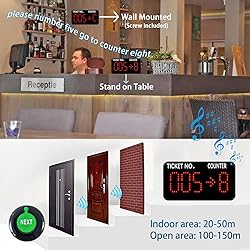
- How Queue Management System works? 1. Customer go to the service station and take a number ticket by thermal printer. 2. Customer wait for their service. 3. When it is their turn, the counter worker will press the "Next" button to call. 4. The customer's number will show on the display screen with prompt sound, so that customer know which counter they should attend. A complete kit includes: (1) Display Monitor To display ticket number. (2) Remote Button To call ticket number. (3) Screw To fix the display on counter or wall. (4) Manual Features: 1 Applications: Restaurant, Coffee Shop, Fast food Chain, Food Court, KTV, Pub, Service Centre, Clinic, Supermarket. Provides fair, organized, efficient customer service 2 Material: ABS 3 Advantage: can avoid to stand in a long queue 4 Display Size :29*15.5*4cm Remote button Size: 6*6*2cm 5 Packing Box: 40*19.5*5.5cm K-C31 display specification: LED counter display for queuing 1. Signal receiver 2.3-digit ticket number and 1-digit counter number 3.Show current calling number and counter number 4.Can put on the Waiting Area for indicate customer. 5.Touch screen and English prompt voice, if needn't English prompt, can change to "dingdong". 6.Can install on the wall and desk. 7.110V-240V Power supply 8.Working voltage: DC12V 9.Dimension: 29*15.5*4cm 10.With high strength ABS plastic shell K-GSN1 remote button specification: Can call number in turn by NEXT key Smooth surface for acrylic plastic case Dimension: 6*6*2cm This simple queue calling system is a best choose for waiting line.
$207,92
31% OFF
$143,39
IMPORT EASILY
By purchasing this product you can deduct VAT with your RUT number
$207,92
31% OFF
$143,39
Envío gratis
 Llega en 12 a 16 días hábiles
Con envío
 Tienes garantia de entrega
Este producto viaja
de USA ![]() a tus manos en
a tus manos en
![]()
 a tus manos en

Conoce más detalles
Power-off memory is one of the highlights of this queue calling system. When this function is switched on, the last number called will be stored automatically. Upon reconnecting the power, the call will start with "Last Number + 1" By default, numbers start at 000 and end at 999. You can set the "Start" and "End" numbers as required, for example, you only need to call numbers between 50 and 200. Once the call reaches the "End" number, the system will automatically restart from the "Start" number. Quick Zero: Suppose you have set the "Start" number to 10 and are currently calling 35. Press the Up and Down keys at the same time to quickly zero. When pressing the NEXT button, the number will start calling again from 10. Note that the "zero" here is not necessarily the number 0, but the "Start" number you set. The receiver consists of 3-digit ticket number and 1-digit counter number. The number display can be mounted on a wall or desktop. Easily adjust the volume, voice mode, number of broadcasts, cycle time, etc. The default voice mode is "Dingdong + Number XXX go to X" NEXT Button: It is a waterproof signal transmitter for the service personnel. When the "NEXT" button is pressed, the number will automatically go to the next one, accompanied by an indicator light prompt. It makes our queue wireless calling system simple and easy to use.
Compra protegida
Disfruta de una experiencia de compra segura y confiable
![]() Garantía de entrega
Garantía de entrega
Con Tiendamia todas tus compras cuentan con Garantía de Entrega o devolución total de tu dinero.
Compras 100% seguras y garantizadas, para que pidas lo que sueñas y lo recibas del mundo a tu puerta.
Tarjetas de Débito y Crédito

Visa

Mastercard

American Express

Dinners

Discover

Alias
Pagos a través de PayPal
Compra procesada en dólares con dinero en cuenta o tarjetas internacionales.

PayPal

.svg)
