


 Garantía de entrega




Artículo: AMZ-B0D2L2XHYL
Qulose
Qulose Surface Pro 7 Keyboard, Bluetooth Keyboard with Precision Trackpad for Microsoft Surface Pro 7 Plus/Pro 7 / Pro 6 / Pro 5 / Pro 4 / Pro 3, Bluetooth 5.1, Ergonomic, Rechargeable Battery
Detalles del producto
Disponibilidad
En stock
En stock
Peso con empaque
0.66 kg
0.66 kg
Devolución
Sí
Sí
Condición
Nuevo
Nuevo
Producto de
Amazon
Amazon
Viaja desde
USA
USA
Sobre este producto
- DescriptionsCompatible ModelsPlease check your tablet model on the back of tabletOnly for Surface Pro 7+/7/6/5/4/3Not for Surface Go 3/2/1Not Surface Pro 8Not Surface Pro X 3/ X 2 / X 1How to Connect the Keyboard?1. Keep pressing the keyboard power button for 3 seconds to turn on the keyboard. (CHRG light shows red and turns on for 3 second, then turns off)2. Press "Fn" plus "C" at the same time, the bluetooth of the keyboard will turn on.3. Turn on the Bluetooth of your Surface, then search "Bluetooh 5.1 Keyboard" for the device, choose “Bluetooth 5.1 Keyboard” option in the searching page to adapt.4. Connection succeeded.Package Includes1 x Detachable Wireless Keyboard 1 x Type-C Charging Cable (No Charger)1 x User Manual
$94,73
49% OFF
$48,58
IMPORT EASILY
By purchasing this product you can deduct VAT with your RUT number
$94,73
49% OFF
$48,58
Envío gratis
 Llega en 5 a 12 días hábiles
Con envío
 Tienes garantia de entrega
Este producto viaja
de USA ![]() a tus manos en
a tus manos en
![]()
 a tus manos en

Conoce más detalles
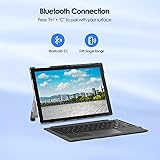
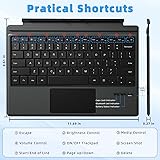
𝐂ompatibility 𝐌odel: This keyboard specially designed for Microsoft surface pro 7 Plus(2021), surface pro 7 (2019), surface pro 6 (2018), surface pro 5 (2017), surface pro 4 (2015) 12.3 inch, surface pro 3 (2014) 12 inch tablet. Not compatible with any other device, please kindly check your tablet model carefully before purchase. (tablet not included) 𝐖ireless 𝐁luetooth 𝟓.𝟏 𝐂onnection: Low-power Bluetooth stability is provided by the Bluetooth 5.1 chip. Operating distance up to 33ft, offering you a comfortable typing experience. To pair the keyboard, please press“Fn + C”key. 𝐄rgonomic and 𝐒hortcut 𝐊eys: The split keys and scissors switches will make your typing as comfortable as that on a laptop. The front row are independent shortcut keys. You can get the brightness setting, screenshot, media, volume, etc. 𝐏recision 𝐌ousepad for 𝐖indows: Qulose keyboard for Microsoft Surface Pro features a multi-touch touchpad. Optimal key spacing allows fast, fluid typing. You can press "Fn+ F7" to automatically enable and lock the touch screen function. 𝐌agnetic 𝐃etachable 𝐖ireless 𝐁luetooth 𝐊eyboard: Innovative magnetically detachable wireless keyboard design allows you take it off from your tablet case. The Surface Pro 7 keyboard makes it easy to do your work on the go. You can hold and remove the keyboard at any time. 𝐓ype 𝐂 𝐂harging and 𝐋ong 𝐁attery 𝐋ife: The keyboard requires charging via a Type C cable, quite convenient and quick charging. Auto sleep/wake initiates when the surface pro keyboard is opened and closed to conserve battery life. 𝐌ultiple 𝐕iewing 𝐀ngles : The build-in kickstand of surface pro can hold securely, adjustment freely. It’s great for comfortable viewing or typing, easily adjusts to whatever comfortable position suits you best. The The windows surface pro 7 keyboard is light and portable, compact size (11.69*8.61*0.27in) and weight (18.57oz) , making it more convenient to carry.
Compra protegida
Disfruta de una experiencia de compra segura y confiable
![]() Garantía de entrega
Garantía de entrega
Con Tiendamia todas tus compras cuentan con Garantía de Entrega o devolución total de tu dinero.
Compras 100% seguras y garantizadas, para que pidas lo que sueñas y lo recibas del mundo a tu puerta.
Tarjetas de Débito y Crédito

Visa

Mastercard

American Express

Dinners

Discover

Alias
Pagos a través de PayPal
Compra procesada en dólares con dinero en cuenta o tarjetas internacionales.

PayPal

.svg)
