


 Garantía de entrega




Artículo: AMZ-B0FPCR8KWJ
Snrigw
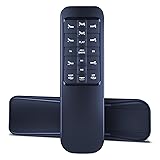
Snrigw Universal Replacement Remote for Dreams/Multiway/King KOIL/Malouf Yiree i400 Sleepmotion S655 Adjustable Bed with Head & Foot Massage
Color:
Black-S655
Detalles del producto
Disponibilidad
En stock
En stock
Peso con empaque
0.20 kg
0.20 kg
Devolución
Sí
Sí
Condición
Nuevo
Nuevo
Producto de
Amazon
Amazon
Viaja desde
USA
USA
Sobre este producto
- Snrigw Universal Replacement Remote for Dreams /Multiway/KING KOIL/Malouf Yiree i400 Sleepmotion S655 Adjustable Bed with Head & Foot Massage
$224,43
31% OFF
$154,78
IMPORT EASILY
By purchasing this product you can deduct VAT with your RUT number
$224,43
31% OFF
$154,78
Envío gratis
 Llega en 5 a 12 días hábiles
Con envío
 Tienes garantia de entrega
Este producto viaja
de USA ![]() a tus manos en
a tus manos en
![]()
 a tus manos en

Conoce más detalles
Perfect Compatibility with Adjustable Bed :Take full command of your sleep experience with our replacement Remote Control for Yiree i400,S655 . This precision-engineered remote ensures flawless synchronization with your adjustable bed base, providing complete control over head/feet positioning, massage functions, anll snore , and zero-gravity settings without any compatibility concerns. Enjoy seamless operation that matches original performance standards. Intuitive Design & Effortless Operation:Simplify your comfort control with our user-friendly remote featuring clearly labeled buttons and ergonomic design. Effortlessly operate your adjustable bed's advanced functions including independent head/feet adjustment, massage intensity control, preset position memory, and built-in flashlight feature. The buttons and logical layout ensure easy nighttime use and instant familiarity for all users, making bedtime adjustments completely hassle-free. Setup:1step:Disconnect the power cord of the control box, wait for 1 minute,and then re-insert it into the socket(complete step 2 within 10 seconds) 2step:Press and hold the HEAD DOWN and FOOT UP buttons on the remote control simultaneously 3step:Then press and hold the blue button on the plug cable for 3 seconds until you hear a beep.This completes the pairing of the remote control *If there is no pairing button on the plug cable, it will be on the control box Tip:1. Please check the battery before operation 2. Check whether the child lock function is turned on(it cannot be operated normally when it is turned on) 3. If pairing does not work, please disconnect the device from the power supply for 1 minute and try again 【Backed by Reliable After-Sales Service 】Please feel free to contact us if you have any query, thanks!
Compra protegida
Disfruta de una experiencia de compra segura y confiable
![]() Garantía de entrega
Garantía de entrega
Con Tiendamia todas tus compras cuentan con Garantía de Entrega o devolución total de tu dinero.
Compras 100% seguras y garantizadas, para que pidas lo que sueñas y lo recibas del mundo a tu puerta.
Tarjetas de Débito y Crédito

Visa

Mastercard

American Express

Dinners

Discover

Alias
Pagos a través de PayPal
Compra procesada en dólares con dinero en cuenta o tarjetas internacionales.

PayPal

.svg)
