




 Garantía de entrega






Artículo: AMZ-B0DF6ZT5QD
PRT
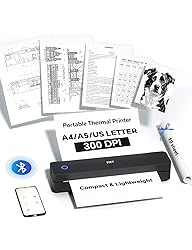
PRT Portable Printer Wireless for Travel, Thermal Inkless Small Bluetooth Mobile Printer, Support 8.5" X 11" US Letter, A4, Compatible with Phone, Laptop for Office, Vehicles, Home Use, 300 DPI, Black
Color:
Black
Style:
Printer+10Sheets
Detalles del producto
Disponibilidad
En stock
En stock
Peso con empaque
0.82 kg
0.82 kg
Devolución
Sí
Sí
Condición
Nuevo
Nuevo
Producto de
Amazon
Amazon
Viaja desde
USA
USA
Sobre este producto
- PRT Portable Printer Wireless for Travel, Thermal Inkless Small Bluetooth Mobile Printer, Support 8.5" X 11" US Letter, A4, Compatible with Phone, Laptop for Office, Vehicles, Home Use, 300 DPI, Black
$162,60
55% OFF
$73,91
IMPORT EASILY
By purchasing this product you can deduct VAT with your RUT number
$162,60
55% OFF
$73,91
Envío gratis
 Llega en 5 a 12 días hábiles
Con envío
 Tienes garantia de entrega
Este producto viaja
de USA ![]() a tus manos en
a tus manos en
![]()
 a tus manos en

Conoce más detalles
👉 COMPACT & SMALL: The 300 dpi MT610 Pro monochrome thermal printer is a real space-saver, weighing only 1.1 pounds and measuring just 10.2 x 2.2 x 1.8 inches. Its compact size makes it portable and easy to carry, suitable for travel, home, school, office and vehicles. (Thermal paper required) 👉 UNIVERSAL COMPATIBILITY & NO NEED FOR INK CARTRIDGES: The portable printer is compatible with a wide range of devices, including phones (iPhone, Android) and laptops (Windows, macOS). It supports a variety of thermal paper sizes, such as 8.5 x 11 inches US letter and legal paper, A4, A5, and 4-inch wide thermal paper. (Important: This inkless printer only supports thermal paper; regular paper is not suitable.) 👉 EASY TO USE: The small printer allows for wireless Bluetooth connection and printing via the "HerePrint" mobile app. It can also connect to laptops and desktops using a USB cable. When using a computer, simply connect the printer with a USB cable first, then install the driver. (Note: Download the driver from the HPRT website on your computer.) 👉 DURABLE AND LONG-LASTING BATTERY: The travel printer comes with a built-in 2000mAh battery. Once fully charged, this battery can support up to 4 hours of continuous printing, enabling the printer to produce up to 360 sheets of paper. 👉 SIMPLE MOBILE DEVICE PRINTING STEPS: (1) Download the "HerePrint" app from the App Store or Google Play on your mobile phone. (2) Turn on the inkless portable printer MT610 Pro. (3) Enable Bluetooth on your phone and click the ‘+’ button in the app to complete the printer connection. Then select the file type and make paper settings, and start printing. 👉 USB PRINTING ON COMPUTERS: (1) Turn on the printer. (2) Connect the printer to your computer via USB cable. (3) Download the corresponding driver for the PRT MT610 Pro from HPRT website. (4) Select "PRT MT610 Pro" as your printer to start printing. Tips: Before downloading the driver, power on the printer and connect the printer to your computer with USB cable first. 👉 PRINT ANYTIME, ANYWHERE: Our inkless printer provide network - free printing, guaranteeing ultimate convenience. Whether you're traveling, at home, in the office, or in a vehicle, you can effortlessly print contracts, office documents, or any other necessary documents from the "HerePrint" smartphone app.
Compra protegida
Disfruta de una experiencia de compra segura y confiable
![]() Garantía de entrega
Garantía de entrega
Con Tiendamia todas tus compras cuentan con Garantía de Entrega o devolución total de tu dinero.
Compras 100% seguras y garantizadas, para que pidas lo que sueñas y lo recibas del mundo a tu puerta.
Tarjetas de Débito y Crédito

Visa

Mastercard

American Express

Dinners

Discover

Alias
Pagos a través de PayPal
Compra procesada en dólares con dinero en cuenta o tarjetas internacionales.

PayPal

.svg)
