




 Garantía de entrega






Artículo: AMZ-B0F8QSCVFW
Hiseeu
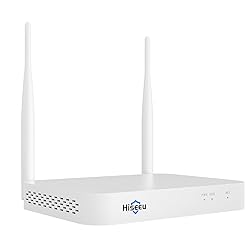
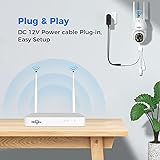
Hiseeu 10CH Wireless Mini White Network Video Recorder, Compatible with 2.5Inch Hard Drive, Add on Hiseeu 3MP/5MP Wireless Camera, Plug-in 12V2A Output Power Adapter
Detalles del producto
Disponibilidad
En stock
En stock
Peso con empaque
0.68 kg
0.68 kg
Devolución
Sí
Sí
Condición
Nuevo
Nuevo
Producto de
Amazon
Amazon
Viaja desde
USA
USA
$343,62
55% OFF
$156,19
IMPORT EASILY
By purchasing this product you can deduct VAT with your RUT number
$343,62
55% OFF
$156,19
Envío gratis
 Llega en 5 a 12 días hábiles
Con envío
 Tienes garantia de entrega
Este producto viaja
de USA ![]() a tus manos en
a tus manos en
![]()
 a tus manos en

Conoce más detalles
【Maximum supported 5.0M megapixel】The latest NVR support work with 5MP cameras, Hiseeu 5MP camera support human detection function, more clearly image, less false motion detection notification. 3MP, 960P and 1080P cameras still support. It can support 16 channels at most. 【Dual WiFi】Comes with built-in Wi-Fi router - NVR (network video Recorder) is a recorder with built in router. It receives and records all cameras with its own bandwidth, consuming 0 bit from your home router. Internet connection is only needed when you want to view from elsewhere. Note: network connection only support 2.4GHZ WIFI., hiseeu 5MP camera support human detection function, more clearly image, less false motion detection notification. 3MP,960P and 1080P camerea still support. 【Multiple playback modes】NVR without HDD, if you want to check the record, please install HDD at first, then system allow to check the record on phone app, computer software and NVR monitor. Note: when u add 5MP camera to NVR, it can only support check playback for 2 cams at the same time. 【No HDD】Hiseeu wireless NVR without HDD, if u need save recordings, plz order new HDD, it can only support 2.5’’ internal HDD and 6TB capacity at most. HDD asin u can search: B07Z3JBTN9. The power supply of NVR should be 12V2A output or 12V3A output. 【How to Connect the Camera to NVR】1.Please right click your NVR mouse choose camera-"+"-Press camera reset button about 10s, click Continue, wait for new IP address show up, then click Continue, if no IP address show up click Search again
Compra protegida
Disfruta de una experiencia de compra segura y confiable
![]() Garantía de entrega
Garantía de entrega
Con Tiendamia todas tus compras cuentan con Garantía de Entrega o devolución total de tu dinero.
Compras 100% seguras y garantizadas, para que pidas lo que sueñas y lo recibas del mundo a tu puerta.
Tarjetas de Débito y Crédito

Visa

Mastercard

American Express

Dinners

Discover

Alias
Pagos a través de PayPal
Compra procesada en dólares con dinero en cuenta o tarjetas internacionales.

PayPal

.svg)
