


 Esta súper oferta termina en


 Garantía de entrega






Artículo: AMZ-B0F9987TCC
PHILIPS
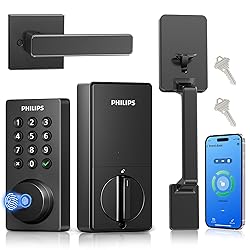
Philips Wi-Fi Smart Door Lock with Handle Set, Keypad Deadbolt for Front Door, Fingerprint Keyless Entry Door Lock with App Remote Control, IP53 Waterproof, Auto Lock, Security Easy Installation
Style:
Wi-Fi+Handle
Detalles del producto
Disponibilidad
En stock
En stock
Peso con empaque
2.64 kg
2.64 kg
Devolución
Sí
Sí
Condición
Nuevo
Nuevo
Producto de
Amazon
Amazon
Viaja desde
USA
USA
Sobre este producto
- Philips 4200 Series – The smart lock with handle set built for your front door. Stop fumbling for keys. This Wi-Fi smart deadbolt with handle set gives you five ways to get in: fingerprint in 0.3 seconds, passcode, app, voice control via Alexa or Google Assistant, or physical backup key. Perfect for families, Airbnb hosts, and anyone tired of carrying keys. Wi-Fi is built in, so no hub is required. Connect directly to your 2.4GHz home Wi-Fi. Check lock status, unlock for guests, and get real-time alerts from anywhere using the Philips Home Access app. The app also sends low-battery notifications, so you will never be caught off guard. Create up to 100 passcodes with custom schedules. Set them to expire after a day, a week, or a specific time window. Ideal for cleaning crews, pet sitters, weekend guests, or short-term rentals. All managed from the app. Set auto-lock from 10 to 180 seconds for peace of mind. Please note: auto-lock is time-based and does not use a door sensor. Make sure the door is fully closed before it engages. Installation is straightforward. Fits most standard front doors with door thickness from 1-3/8" to 2", backset of 2-3/8" or 2-3/4", and deadbolt hole size of 1-1/2" or 2-1/8". Works on both left-handed and right-handed doors. After installation, press and hold the reset button for 5 seconds for auto-calibration. Most installations take under 30 minutes. Important: do not over-tighten screws, as this can cause the deadbolt to stick. Need help? Our U.S.-based support team is available Monday through Friday. The lock requires 8 AA batteries (not included). For best battery life, use high-quality alkaline or rechargeable batteries. Supports 2.4GHz Wi-Fi only. Auto-lock is off by default – enable it in the app. What You Get: one Philips 4200 Series smart deadbolt with handle set, two physical backup keys, one mounting plate and screws, and a user manual. Make your front door smarter today.
$223,53
27% OFF
$162,53
IMPORT EASILY
By purchasing this product you can deduct VAT with your RUT number
★ APPLIES FRANCHISE
$223,53
27% OFF
$162,53
Envío gratis
 Llega en 5 a 12 días hábiles
Con envío
 Tienes garantia de entrega
Este producto viaja
de USA ![]() a tus manos en
a tus manos en
![]()
 a tus manos en

Conoce más detalles
Fingerprint Unlock – One Touch to Open. Skip the keys. Just touch and go. Unlock in 0.3 seconds – faster than finding your keys. Everyone in the family gets instant access to your front door, all from one complete handle set. Perfect for busy mornings with hands full of coffee, backpacks, and grocery bags. Remote Control via App – No hub, no hassle. The Philips Wi-Fi smart door lock comes with built-in Wi-Fi, enabling you to check lock status and manage access remotely anytime through the Philips HomeAccess App. No hub needed—just seamless smart control at your fingertips. (Note: Only supports 2.4GHz Wi-Fi) 5 Ways to Unlock: Fingerprint, app control, passcode, mechanical key, and voice control via Alexa or Google Assistant. Perfect for modern smart homes seeking flexible and secure access. One lock for every person and every situation. Smart Passcode Management – Control who comes and when. Create up to 100 passcodes. Set them to expire after a day, a week, or a specific time window. Perfect for cleaning crews, pet sitters, weekend guests, or short‑term rentals. All managed from the app—no need to be home. Auto-Lock & Real-Time Alerts – Always know your door is secure. Set auto-lock from 10 to 180 seconds. Get instant notifications every time the door is unlocked—and see who unlocked it. Whether you’re upstairs, at work, or on vacation, you’ll know your home is safe. Easy Installation & U.S.-Based Support. It's designed to fit a wide array of standard door preparations. 𝐏lease note, 𝐅its most doors, (𝟏-𝟑/𝟖" to 𝟐" thick). Need help? Reach our U.S.-Based Support team Monday to Friday for quick assistance. Note: This Smart Lock's batteries are not included, please use 1.5V alkaline batteries to ensure the door lock functions properly. Installation Instructions: 1. The lock is set by default for right-hand doors. If the customer’s door is left-handed, please follow the instruction manual after installation to adjust the lock settings to fit a left-hand door. 2. During installation, avoid over-tightening the screws, as this may prevent the motor from driving the lock properly. 3. If the connection cable is not installed correctly, it may loosen during use, causing power loss or cable damage, which can stop the lock from working. 4. During the installation process, be sure to watch the setup video to avoid malfunctions caused by incorrect settings.
Compra protegida
Disfruta de una experiencia de compra segura y confiable
![]() Garantía de entrega
Garantía de entrega
Con Tiendamia todas tus compras cuentan con Garantía de Entrega o devolución total de tu dinero.
Compras 100% seguras y garantizadas, para que pidas lo que sueñas y lo recibas del mundo a tu puerta.
Tarjetas de Débito y Crédito

Visa

Mastercard

American Express

Dinners

Discover

Alias
Pagos a través de PayPal
Compra procesada en dólares con dinero en cuenta o tarjetas internacionales.

PayPal

.svg)
