


 Esta súper oferta termina en


 Garantía de entrega






Artículo: AMZ-B0FXX9JDC8
TGHCP
Voice Replacement for All Fireseries TV Remote, TV Cube/Stick 4K Max/4K, Stick(2nd/3rd Gen), Stick Lite, Hisense, Omni Series, Insignia/TCL/Pioneer Smart TV
Detalles del producto
Disponibilidad
En stock
En stock
Peso con empaque
0.06 kg
0.06 kg
Devolución
Sí
Sí
Condición
Nuevo
Nuevo
Producto de
Amazon
Amazon
Viaja desde
USA
USA
Sobre este producto
- Information: Specification: Material:Plastic Battery Type:2 AAA batteries (Not included) Compatible with : Smart TVs Cube (3rd Generation) Smart TVs Cube (2nd Generation) Smart TVs Cube (1st Generation) Smart TVs Stick 4K Max (2nd Generation) Smart TVs Stick 4K Max (1st Generation) Smart TVs Stick 4K (2nd Generation) Smart TVs Stick 4K (1st Generation) Smart TVs Stick (3rd Generation) Smart TVs Stick (2nd Generation) Smart TVs Stick Lite Smart TVs Stick HD Smart TVs (3rd Generation) For Insignia Smart TVs F30 / F20 / F50 / DF710 / DF711 / DF310 / DF510 / DF311 / DF620 series For Toshiba Smart TVs LF711 / LF621U / LF421U / LF221U / C350 / A810U / A710U / M550 / V35 series For Pioneer TVs PN450 / PN651 / PN851 / PN951 series Smart TV Omni Series Omni QLED Series Smart TV 4-Series Smart TV 2-Series Package list: 1 * User Manual 1 * Replacement Remote Control How to Pair? Press the Home button about 10-15 seconds until the LED indicator starts to rapidly flash, then waiting about 30-60 seconds (Entering Pairing mode, LED Flash), then your remote will automatically pair with your device.
$16,75
39% OFF
$10,25
IMPORT EASILY
By purchasing this product you can deduct VAT with your RUT number
★ APPLIES FRANCHISE
$16,75
39% OFF
$10,25
Envío gratis
 Llega en 5 a 12 días hábiles
Con envío
 Tienes garantia de entrega
Este producto viaja
de USA ![]() a tus manos en
a tus manos en
![]()
 a tus manos en

Conoce más detalles
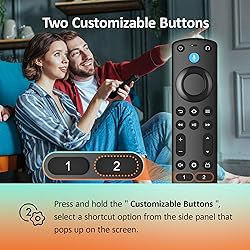
Compatible with: Works with Smart TVs Cube (1st / 2nd / 3rd Gen), Smart TVs Stick 4K Max (1st / 2nd Gen), Smart TVs Stick 4K (1st / 2nd Gen), Smart TVs Stick (2nd / 3rd Gen), Smart TVs Stick Lite, TV Stick HD, Smart TVs (3rd Gen), and is a great fit for Hisense, Omni Series, 4-Series, Insignia, Toshiba, Pioneer Smart TV Not Compatible: This remote will not work with Smart TVs (1st and 2nd Gen), Smart TVs Stick (1st Gen), or Smart TVs Edition smart TVs. If the product does not work, send us a message — we will make sure to give you the best solution in the end With Voice Function: Use your voice to find your favorite content. Easily jump to your favorite scenes using standard navigation and playback controls. Includes 4 preset app shortcut buttons for quick access to your favorite content How to Pair: Start by removing the stick from your TV and disconnecting the power from the stick. Then reconnect the power and insert the stick back into your TV. Next, press and hold the Home button for about 10-15 seconds until the LED indicator flashes amber rapidly for 10 seconds. After that, your remote will automatically pair with your device Package Includes: 1× Voice Remote Control (AAA batteries not included), 1× Detailed User Guide, and dedicated customer support to help ensure everything works smoothly
Compra protegida
Disfruta de una experiencia de compra segura y confiable
![]() Garantía de entrega
Garantía de entrega
Con Tiendamia todas tus compras cuentan con Garantía de Entrega o devolución total de tu dinero.
Compras 100% seguras y garantizadas, para que pidas lo que sueñas y lo recibas del mundo a tu puerta.
Tarjetas de Débito y Crédito

Visa

Mastercard

American Express

Dinners

Discover

Alias
Pagos a través de PayPal
Compra procesada en dólares con dinero en cuenta o tarjetas internacionales.

PayPal

.svg)
