




 Garantía de entrega






Artículo: AMZ-B0FDGPJSXR
ProtoArc
ProtoArc Wired USB Trackpad for Windows 10/11, Large High-Precision T1 Wired Trackpad Mouse with Multi-Gesture, Ultra Slim Portable Aluminum Touchpad Mouse for Computer/Desktop/Laptop, Grey Black
Detalles del producto
Disponibilidad
En stock
En stock
Peso con empaque
0.38 kg
0.38 kg
Devolución
Sí
Sí
Condición
Nuevo
Nuevo
Producto de
Amazon
Amazon
Viaja desde
USA
USA
Sobre este producto
- wired touchpad for windows
$72,75
31% OFF
$50,17
IMPORT EASILY
By purchasing this product you can deduct VAT with your RUT number
$72,75
31% OFF
$50,17
Envío gratis
 Llega en 5 a 12 días hábiles
Con envío
 Tienes garantia de entrega
Este producto viaja
de USA ![]() a tus manos en
a tus manos en
![]()
 a tus manos en

Conoce más detalles
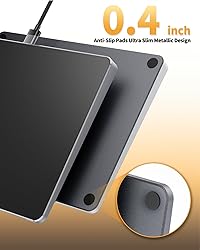
Windows Only: The Large Wired Trackpad for Windows10/11 is compatible with Windows 11, Windows 10, PC, laptops and desktop computers. Note: Not compatible with Mac/Chrome OS/Linux. Not recommended for use on other systems. Some touchpad gestures or functions may be missing Convenient left and right physical clicks: The wired trackpad supports physical clicks of the left and right buttons at the bottom to realize the left and right mouse button functions. It also supports full-area single-click to realize the left mouse button function and two-finger single-tap for right mouse clicks, which is convenient for you to select text/documents and drag large areas easily How to drag files and select text: Double-click with one finger + hold/slide to drag files or select text Multiple gestures support: The touchpad supports multiple gestures and supports up to four-finger operation, which is smoother than the laptop touchpad operation. Fast and sensitive response, at your fingertips. Multiple functions, including smooth screen clicks, scrolling up and down pages, pinching to enlarge photos, etc. How to adjust the touchpad cursor speed: Open "Windows Settings" → "Bluetooth and other devices" → "Touchpad". Adjust the "Cursor Speed" slider to suit your preference (slower ← → faster) Extra Large Metal Touchpad: Large 6.4 inch touch screen, size 6.4*4.8*0.4 inches, thickness 0.19in-0.39in, compared with the traditional touch pad is even thinner Plug and Play, Stable USB C Connection: Simply plug the USB cable into the USB port of your computer and the touchpad is ready to use, no additional drivers required. The USB C cable's reliable and stable connection allows you to use it easily without any connection issues Note: If you disable the built-in touchpad on your laptop, any external wired or wireless touchpad you connect will usually also be disabled and fail to work properly.
Compra protegida
Disfruta de una experiencia de compra segura y confiable
![]() Garantía de entrega
Garantía de entrega
Con Tiendamia todas tus compras cuentan con Garantía de Entrega o devolución total de tu dinero.
Compras 100% seguras y garantizadas, para que pidas lo que sueñas y lo recibas del mundo a tu puerta.
Tarjetas de Débito y Crédito

Visa

Mastercard

American Express

Dinners

Discover

Alias
Pagos a través de PayPal
Compra procesada en dólares con dinero en cuenta o tarjetas internacionales.

PayPal

.svg)
