




 Garantía de entrega






Artículo: AMZ-B0G3H672WT
SJUIF
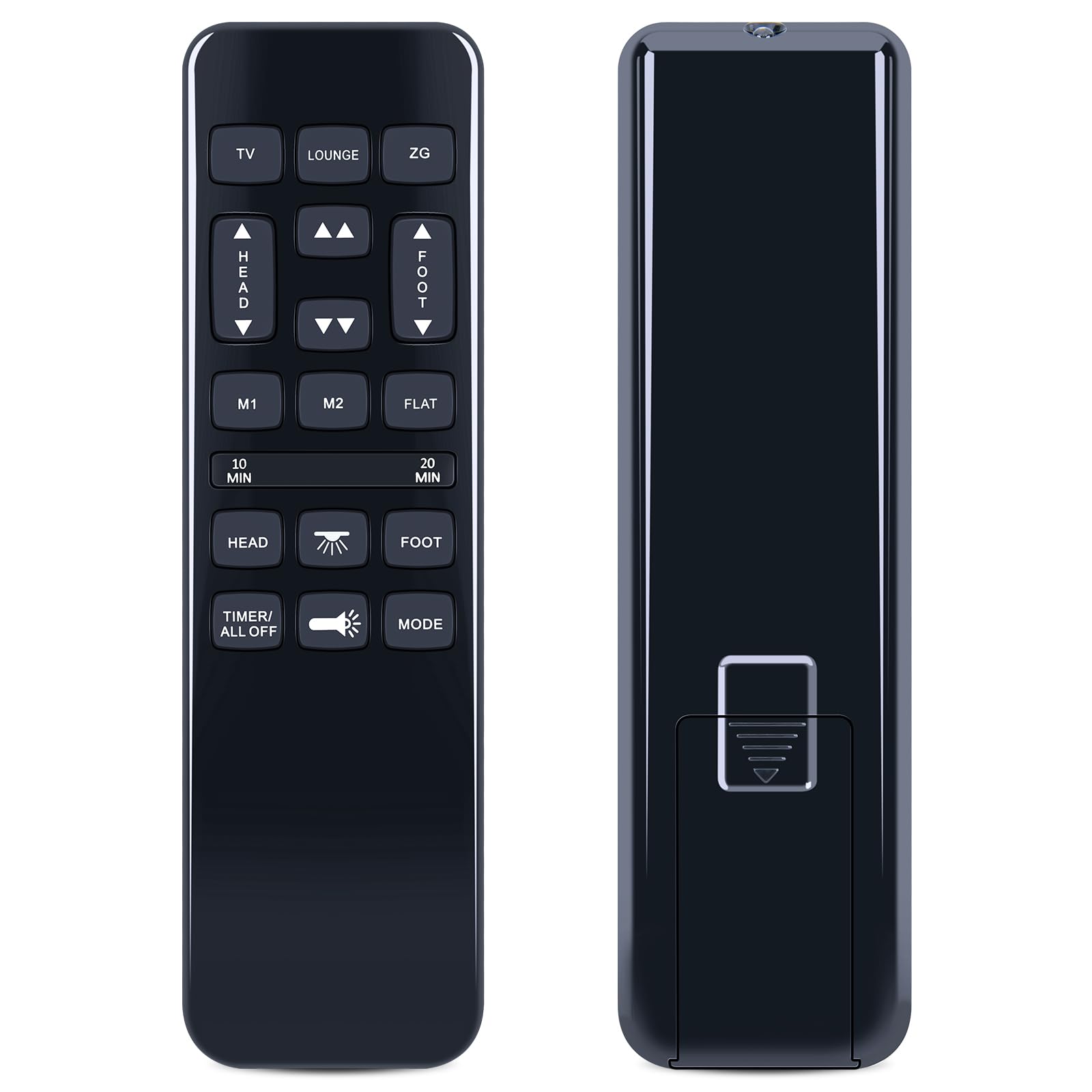
SJUIF HJH55 Replacement Remote Control for Richmat HJH92S Adjustable Bed Base, for Classic Brands Bed, for BCP Best Choice Products, for Mattress Firm 600 and 3000 Series, for GhostBed/Ergonomic Twin
Detalles del producto
Disponibilidad
En stock
En stock
Peso con empaque
0.20 kg
0.20 kg
Devolución
Sí
Sí
Condición
Nuevo
Nuevo
Producto de
Amazon
Amazon
Viaja desde
USA
USA
Sobre este producto
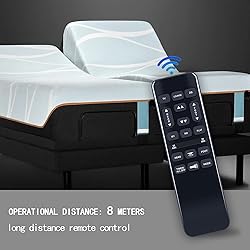
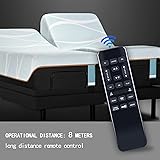
- Never Struggle with Lost or Broken Remotes Again!This premium replacement remote is designed to seamlessly take over control of your device. Get ready to enjoy your entertainment system to the fullest.✔ Perfect Compatibility Designed to replace the original remote for Richmat HJH92S Adjustable Bed Base, for Classic Brands Bed, for BCP Best Choice Products, for Mattress Firm 600 and 3000 Series, for GhostBed/Ergonomic Twin Easy Setup--Just follow the instructions✔ Durability & Everyday ComfortHigh-quality ABS Plastic:Built with reinforced buttons and a sturdy ABS casing to withstand daily use and accidental dropsErgonomic Design:Fits comfortably in your hand, with logically grouped buttons and a responsive keypad for intuitive controlAdvanced Chip: Equipped with a newly upgraded intelligent chip, this remote delivers lightning-fast signal processing and near-instant response with every button press✔ The Hassle-Free Choice for Smart ShoppersSaving on the cost of purchasing an OEM replacement Ready to use after installing batteries (batteries sold seperately) Backed by our 12-hour rapid response after-sale servicePackage Includes:1 x Replacement Remote Control (Batteries not included)
$140,18
44% OFF
$77,88
IMPORT EASILY
By purchasing this product you can deduct VAT with your RUT number
$140,18
44% OFF
$77,88
Envío gratis
 Llega en 5 a 12 días hábiles
Con envío
 Tienes garantia de entrega
Este producto viaja
de USA ![]() a tus manos en
a tus manos en
![]()
 a tus manos en

Conoce más detalles
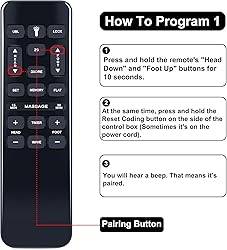
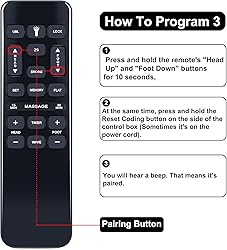
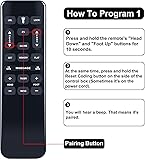
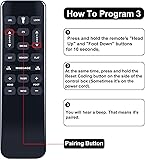
Compatible Models:This New Replacement Remote Control Compatible for Richmat HJH55 HJH92S Adjustable Bed Base, for Classic Brands Bed, for BCP Best Choice Products, for Mattress Firm 600 and 3000 Series, for GhostBed/Ergonomic Twin 【NOTE】Not compatible with other brands or types. Before ordering, please ensure your original remote control matches the buttons and appearance shown in the illustration. Otherwise, it may not function properly Pairing method ①: Step 1) Press and hold the [HEAD UP] and [FOOT UP] buttons on the remote at the same time for 10 seconds; Step 2) Push the button on the side of thecontrol box underneath the bed where is indicates reset coding (usually it isthe button indicated by the word "Learn" or "Reset Coding".Do not press and hold the side button, just press and release. Step 3) Once you hear beeps that willindicate that the remote is synced Pairing method ②: Step 1) Press and hold the [HEAD DOWN] and [FOOT UP] buttons on the remote at the same time for 10 seconds; Step 2) Push the button on the side of thecontrol box underneath the bed where is indicates reset coding (usually it isthe button indicated by the word "Learn" or "Reset Coding".Do not press and hold the side button, just press and release. Step 3) Once you hear beeps that willindicate that the remote is synced Pairing method ③: Step 1) Press and hold the [HEAD UP] and [FOOT DOWN] buttons on the remote at the same time for 10 seconds; Step 2) Push the button on the side of thecontrol box underneath the bed where is indicates reset coding (usually it isthe button indicated by the word "Learn" or "Reset Coding".Do not press and hold the side button, just press and release. Step 3) Once you hear beeps that willindicate that the remote is synced
Compra protegida
Disfruta de una experiencia de compra segura y confiable
![]() Garantía de entrega
Garantía de entrega
Con Tiendamia todas tus compras cuentan con Garantía de Entrega o devolución total de tu dinero.
Compras 100% seguras y garantizadas, para que pidas lo que sueñas y lo recibas del mundo a tu puerta.
Tarjetas de Débito y Crédito

Visa

Mastercard

American Express

Dinners

Discover

Alias
Pagos a través de PayPal
Compra procesada en dólares con dinero en cuenta o tarjetas internacionales.

PayPal

.svg)
